HOME     PROJECTS     STORIES     PHOTO WIZARD     ABOUT     WEBSITE

Wednesday, July 23, 2008

Food for Thought


There was never yet an uninteresting life. Such a thing is an impossibility. Inside the dullest exterior, there is a drama, a comedy, and a tragedy.
~Mark Twain (1835 – 1910)

Tuesday, July 22, 2008

Reducing Picture Size


Have you come across this message using our Photo Wizard? Currently, our software works best with photo files that are smaller than 500 KB. You can load a larger file, but if you try to load anything over 900 KB you'll probably get this message. Our programmer tells us this road block has to do with internet connections and server size. Be assured that we are working on it! We want our Photo Wizard to be 100% user friendly. Here are some helpful hints that will let you resize your picture files so they will easily load into the Photo Wizard. If you get stuck, drop us a note at wizard@storiesbyme.com. You can even email your photos to us and we will resize them for your project.

The first step is to go to our Photo Wizard. Visit storiesbyme.com and look for the Photo Wizard (center of the menu bar). Click on it to bring up the Photo Wizard page. Be sure to read Step 1 Gather Pictures. Some photos just format easier than others for these projects and we want you to be pleased with the end results!


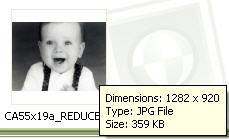
So, how do you know if your pictures fit the size requirements? You can try to load them into the Photo Wizard and see if you get the message. You can also open your directory and check the file size. Most programs will display a pop-up window with file data if you place your cursor over the file name. At 1.68 MB, this picture file is too big for the Photo Wizard.

We'll discuss two easy options for reducing picture size. If you have Photo Shop, Elements or another photo editing software, read option one. If you're not sure what is available on your computer, option two uses a free on-line photo editing utiliity.

Option1: Photo Editing Software
Open your picture in the editing software. Look for the command "Image Size," "Resize," or
"Resample."

This picture's digital file was created using a scanner and was scanned at 400 dpi (dots per inch). At its current resolution, I could easily print a large copy and be happy with the resulting image. Stories by Me products do not require high resolution images for great results! A memory candle picture is smaller than four inches and our memory block puzzle measures about a six inch square. The current size of the picture measures about 6.4 by 4.6 inches. We could reduce the measurement, but if we just tweak the resolution (dpi) we should have a file that can easily be passed back and forth across the internet. For this example, we changed the resolution from 400 dpi to 200. BE CAREFUL to save your changes using the SAVE AS file option! Otherwise, you will write over your original file and lose the high resolution data. We usually scan important pictures in TIFF format. We then scan (or convert) a second copy as a JPEG (a much more manageable file size and internet friendly). The original gets stored in a secure location. We won't touch it again unless we need to make a new copy of it. By making this one change, we were able to reduce a 1.68 MB file down to 296 KB.

Option2: On-line Photo Editing
To use the easy three step, on-line option, go to www.resize2mail.com. Use the browse option to find the picture that needs resizing. Our software will let you crop your picture so use the third option listed in step 2. We typically use 50% reduction unless we have a REALLY big file. You can also rotate your picture if it happens to be on its side. Press the OK button and let the software do its thing. Be patient! Depending on the size of your file, your internet connection and traffic on the world-wide web, it might a minute or two.
Confirm that the final file size falls into an acceptable range (we recommend something that is at least 100 KB, but not over 800 KB.) Be sure to use the SAVE AS option (see Option 1 above) when you save your new picture file.

Now you are ready to load your picture file into our Photo Wizard. Wait until you see how easy it is to format your pictures for the Stories by Me projects! Be sure to check back. We'll give you other helpful hints for using the software and let you know about new features that are coming!

Monday, July 21, 2008

When Life Gets You Down

I became familiar with the story of John August Peterson in recent years. I cannot claim to be a direct descendant of John's. I was lucky to marry into the family. My children, however, can claim this heritage and appreciate the family traits that fill their veins. No matter your ancestry, this is a story of hope and courage, and it can be appreciated by all.

My husband's family comes from early Mormon stock. For those unfamiliar with the term, this refers to the early members of the Church of Jesus Christ of Latter-day Saints (LDS) also categorized as pioneers. The Peterson family joined the newly organized church in 1852. They were living on the Danish island of Bornholm at the time. Persecution was great for those of the LDS faith and the family's only desire was to go to America to be with the Saints in Zion. They sold their farm and home, but didn't have enough money to take the entire family. Fifteen-year-old Carl was left behind. It would take six more years to earn his fare and reunite the family. John August was the oldest living Peterson son. He had a wife and new baby. Altogether, seven family members made the voyage. The family records indicate a rough, but manageable ocean passage. It was after they had made their way to Wyoming and loaded the wagons that their dreams began to unravel.

Most of the family immediately became ill with mountain fever. The wagons started out in early August. Within a week the baby had died. The grave was dug and having no coffin, the women in the party filled the hole with a thick layer of wild flowers so John would have a cushion on which to rest his infant. The next day, John's wife died. John's mother and one of his sisters continued to suffer the effects of the climate change and laborious travel. Winter came early and added to their misery. Just as they family made their way down Immigration Canyon in the Salt Lake Valley, sister, Sophia died. A grave was dug in the snow near what is now the state monument "This is the Place." Another woman died during breakfast, so the grave was made wider and the women were buried side by side.

Whenever I think life is hard, I think of John August Peterson and all that he endured. Suddenly, my problems seem pretty minuscule. John never gave up. He made a new life in the Salt Lake valley. He married a wonderful woman by the name of Metta and together they had eight children, one of which is my husband's great-grandfather.

July 24th is a big holiday in the state of Utah. We always look forward to the celebrations and try to spend a little time reflecting on what got us to this point of our lives. It was one hundred and sixty-one years ago that the first Mormon pioneers courageously looked around and and decided to call the barren desert home. Familiar with Salt Lake City? Not so barren anymore! The moral of their stories? With courage, tenacity and faith, you can do anything. Scratch that, we can do anything!

"This great pioneering movement of more than a century ago goes forward with latter-day pioneers. Today pioneer blood flows in our veins just as it did with those who walked west. It's the essence of our courage to face modern-day mountains and our commitment to carry on. " ~Gordon B. Hinckley (read full article here.)

Sunday, July 20, 2008

Inquiring Minds on Photo Scans

I received a phone call from a friend with a question about photo preservation. She has several thumbnail-sized pictures of ancestors. In some cases, it is the only picture that they have of the individual and she wants to make sure that they preserve these images in the best way possible. All of us can relate. Who doesn't have teeny-tiny pictures in our collection of family faces? Some of our photographs have been cut into oval shapes and dutifully pasted into genealogy records by those doing the best they could with the technology of their day.

So, given the wonderful technology of the 21st century, what is the best method for digitally preserving these pictures? We usually recommend scanning pictures at 300 dpi. This will create a file that is more than adequate for regular viewing and in most cases will let you enlarge the picture without sacrificing resolution. We know that the .tiff format offers a higher quality image as it is uncompressed, but it comes at the price of big (sometimes enormous) file size! Here is Brenda's question in a nutshell: Is it better to scan these little pictures at a high resolution, say 600 or even 1200 dpi, and save them in .jpg format, or will scanning them at a lower resolution in .tif format improve their resolution?

We did a quick experiment on Great-grandma Ellen. Thanks for helping, Grandma! This picture only measures .75 inches x 1.0 inch. To add to the dilemma, the image happens to be a copy of a long-lost original. We scanned the picture at 300 and 600 dpi (dots per inch) in both jpg and tiff formats. The file sizes ranged from 59 KB to just over 1MB.

300 dpi jpg = 59 KB
300 dpi tiff = 252 KB
600 dpi jpg = 241 KB
600 dpi tiff = 1.07 MB

There is virtually no visual difference in the resolution of any of our pictures. The print size of the 600 dpi is more than double that of the 300 dpi scans, but the smaller files enlarged easily and there is no noticeable difference in resolution when they are printed. Does this mean that we'll be happy with the outcome of pictures scanned at 300 dpi?

Please share any information you have on the best method for preserving small photographs. Inquiring minds want to know!

Friday, July 18, 2008

Every Child is a Story Yet to be Told

***If you're just checking out our blog for the first time - go take a look at our FREE GIVEAWAY!!***


This photo collection has proudly claimed prime wall space for the last decade and a half, even though we have moved four times! The pictures document our family faces at approximately the same age. It's easy to see the similarities with those sweet baby faces staring at you!

Everyone can be a fabulous decorator using vinyl lettering! We found this great saying from DCWV Home. It's part of their baby collection. We bought ours at Robert's Crafts where there were oodles and oodles of sayings in a variety of vinyl colors. Of course, we LOVE this sentiment as we have made it our life's mission to look for ways to preserve these stories!

Thursday, July 17, 2008

Together We Can Do So Much!

I don't know about you, but as we slide into the bottom half of July, the schedule gets a little relaxed, the morning wake-up calls come a bit late, and the house falls into disarray. (Who are we kidding? It hits rock bottom on the cleanliness scale!)

We need an escape to the beach! As a true-blue Southern CA girl, I miss my roots. I tried to take the kids to the Great Salt Lake once. We spent less than 10 minutes floating amid billions of shrimp flies...I kid you not. It took hours to rid the muck between the toes and the smell...oh the smell defies description. Gratefully, we can now laugh at the memory!

We don't see any beach time in the foreseeable future. Who can afford 1000 mile road trips on $4.50 a-gallon gas? (Especially if you're stuck driving a 12-mile a gallon guzzler!) This favorite beach scene conjures feelings of how summer should be spent. Who wouldn't go for a couple of uninterrupted hours of fun in the sun, accompanied by a great friend, and (not to be missed) being the epitome of high fashion! We'll hang on to the old memories and live vicariously through the stories of others!

Love the picture? Look for it on our vintage tins!

Wednesday, July 16, 2008

It's About Time!

We are finally ready to unveil our Memory Tree Magnet Boards. They have been a long time coming! We are so excited about this new product and can't wait to share it with everyone.

Pick your favorite pattern (we offer several) and start hunting for family pictures! We provide enough materials for you to display 3 or 4 generations. Two sizes are available: 12x12" magnet boards for a powerful family representation and a portable 8x8" version for families on the go.

Personalize the magnets with your family faces and create a dynamic memory of your heritage! It's a great way to learn your family lineage, or an equally fun way to mix things up.

Our Memory Tree Kits aren't online just yet, so if you are interested, please email us at sales@storiesbyme.com.

Here's our 12x12 patterns. Clockwise: Steel Swirl, Gray Diamond, Peach Dot and Green Leaf. 8x8 versions are available in Peach Dot or Green Leaf. Douple click on the picture if you want to see a bigger version.